Three weeks ago I had a .NET backend with maybe 40% of the services wired up, a half-finished Vue frontend, and a vague plan. Today Rasepi has a block-level translation engine with glossary management and style rules, a freshness scoring system with expiry templates and review workflows, AI-powered semantic search with RAG, a full plugin SDK with action guards and event pipelines, collaborative real-time editing, a complete marketing website with pricing pages, a developer documentation portal, a blog with 14 posts, automated translations into 7 languages, and a waitlist form that actually sends emails.
I did not do this alone. I had Claude running in VS Code every evening for hours and sometimes all day even, and it was genuinely transformative for the parts it could help with. But there's a chasm between "building an app" and "having something you could actually sell to another human being," and that chasm is filled with tons of setup pages, manual configuration, email deliverability settings, and DNS records. Claude just can't talk to all these services yet.
People rarely talk about that part.
Could I Have Done This Without AI?
Look, I have over 30 years of experience building software. Could I have built all of this without Claude? Probably. But not in three weeks. Not even close. The AI accelerated everything that involves typing code into files, and that is a massive part of any project.
But here's the thing people miss when they talk about "vibe coding" and building entire apps with AI: you still need to know what you're doing. Claude can tell you every single step required to deploy a Cloudflare Worker with a D1 database. It can walk you through OpenIddict configuration. It can explain DNS records and SPF setup. The problem is that its knowledge is often outdated. Platforms update their dashboards, move settings around, deprecate features, rename things. And Claude doesn't know.
I didn't even use only one AI. ChatGPT occasionally knew more about specific services, especially when Claude's training data was a few months behind on a particular platform's documentation. Some days I had both open side by side, cross-referencing their suggestions against what I was actually seeing in the dashboard.
But the deeper point is this: to have a sellable app, you absolutely need to know how hosting works. How domains work. How code signing certificates work. How databases work. How email deliverability works. How OAuth2 flows actually function, not just the code that implements them. Can you build an app without that knowledge? Sure. Will it get you anywhere? Likely not. You'll have something that runs on localhost and impresses nobody outside your own machine.
The 80% That Felt Like Magic
Let me be clear about what worked, because it genuinely worked well. For churning out service interfaces, implementing CRUD controllers, writing EF Core configurations, and building Vue components, Claude is absurdly fast.
Here's an example. When I needed to add the glossary management system, I described the requirement: tenant-scoped glossaries, CSV import/export, individual term CRUD, and a sync mechanism with DeepL's glossary API. Claude produced the entity models, the service interface and implementation, the controller with proper authorization attributes, and the Pinia store. All in maybe 20 minutes. Would have taken me most of a day to write all that by hand.
The translation engine was similar. The block-level architecture with SHA256 content hashing, the staleness detection, the orchestrator that coordinates between services. Claude understood the pattern after I explained it once and then replicated it consistently across dozens of files. The freshness scoring system, the review workflows, the expiry notification pipeline. Service after service, wired up and working.
For the marketing site, Claude built entire HTML pages from descriptions. "A pricing page with a free tier, a team tier, and an enterprise tier. Dark background. Use the green accent." And it just... produced one. Including responsive breakpoints and hover states.
That's the magic part. It is real.
Taming the Machine
But it's not like I just typed "build me an app" and walked away. Working with Claude is its own skill, and I spent the first few days doing it badly.
The initial output is always... fine. Technically correct, reasonably structured, but generic. Claude writes code the way it writes prose: competent, predictable, and deeply average. Left to its own devices, it'll produce the same controller structure every framework tutorial uses. The same service pattern. The same component layout. It works, but it's not yours.
So you start to train it. Not formally, not with fine-tuning, but through repetition and correction. "No, I want the service interface separate from the implementation." "Always use this authorization attribute pattern." "The tenant context comes from middleware, not from the request body." Turn after turn after turn. Some days I felt like I was pair programming with a very enthusiastic junior who keeps forgetting what we decided yesterday.
And then something clicks. After enough corrections, after enough examples in the codebase for it to read, Claude starts getting it right on the first try. It picks up your naming conventions. It knows where you put your DTOs. It follows your error handling pattern without being asked. That transition from "annoying" to "productive" took maybe four or five days of consistent work.
The blog posts were a similar story. Claude's default writing voice is instantly recognizable. That polished, slightly distant, perfectly structured style that reads like every AI-generated blog post you've ever seen. I went through multiple rounds building a style guide, feeding it examples of how I actually write, pointing out every "it's worth noting" and every em dash (seriously, the em dash addiction is real). Eventually I built a whole skill file, a set of instructions that Claude loads before writing anything for the Rasepi blog.
This post, for the record, is Claude. With my input, my corrections, my direction. I described what I wanted to say, pointed it at the style guide, and then spent time going back and forth until the voice felt right. That's the actual workflow. Not "AI writes it" and not "I write it." It's a conversation that produces something neither of us would have written alone.
I also built custom instructions for the codebase itself. A copilot-instructions file that explains the architecture, the translation system, the tenant isolation rules, the coding conventions. Claude reads this at the start of every session, and the difference is night and day. Without it, Claude guesses. With it, Claude knows.
The point is: the productivity gains are real, but they're not free. You invest time upfront teaching the AI how you work, and that investment pays off over weeks. Skip that step and you'll spend more time fixing Claude's output than you would have spent writing the code yourself.
Then You Need to Actually Deploy the Thing
Here is where the story changes.
You have a working application on localhost. Beautiful. Now put it on the internet. Make it send emails. Let people sign up. Accept payments eventually. Protect it from bots. Give it a domain name that resolves correctly.
Claude cannot help you with any of this. Not really.
I don't mean it produces bad suggestions. I mean it fundamentally cannot interact with the systems you need to configure. And the configuration is where you spend your time, not writing code.
Cloudflare: A Case Study in "Figure It Out Yourself"
Rasepi's marketing site runs on Cloudflare Pages. The waitlist API is a Cloudflare Worker with a D1 database. Sounds straightforward until you actually have to set it up.
Claude has never seen your Cloudflare dashboard. It can tell you "add a CNAME record" but it cannot tell you which of the 14 tabs contains the DNS settings for your particular domain. D1 database bindings need a specific database ID in your wrangler.toml. Environment secrets go through wrangler secret put. CORS has to match your actual deployed origins, not localhost. Turnstile needs keys from yet another dashboard section.
I spent almost an entire day getting the Worker to correctly verify Turnstile tokens, accept form submissions, store them in D1, and send confirmation emails. Claude helped me write the Worker code itself. But the deployment, the wrangler configuration, the secret management, the DNS propagation debugging? That was all me.
OAuth2: The Configuration Labyrinth
Authentication is the best example of the gap between "code" and "product."
Claude can absolutely write you an OAuth2 integration. It knows the OIDC spec, it can produce middleware, it understands JWT claims. For our dev environment I have a DevAuthHandler that mints tokens with tenant_id and sub claims from a simple bearer string pattern. Claude wrote that in minutes.
But production auth means OpenIddict, and OpenIddict means figuring out sub claims, tenant_id claims, callback URLs, JavaScript origins, logout URIs, and all the other shenanigans that come with a real identity setup. And that's before you even get to the external providers.
Because your users want to log in with Google, Microsoft, or GitHub. And Claude can't log into any of those developer consoles for you. It cannot:
- Create an OAuth application in the Google Cloud Console and generate a client ID and secret
- Register an app in the Microsoft Entra portal and configure the redirect URIs
- Set up a GitHub OAuth App and grab the credentials
- Configure each provider's callback URLs for every environment you run
- Wire up the correct scopes, consent screens, and token endpoints
Each provider has its own developer portal, its own terminology, its own flow for generating credentials. Google calls it a "consent screen." Microsoft calls it "app registrations." GitHub calls it "OAuth Apps" (not to be confused with "GitHub Apps," which are a different thing entirely). And every single one of them requires you to manually copy a client ID and secret into your configuration.
Claude can write the OpenIddict server configuration, the external provider middleware, the claim transformation logic. But the actual credential generation, the portal navigation, the environment-specific URL setup? That's all you, in a browser, clicking through dashboards.
Email: It's Never Just "Send an Email"
The code to send an email via the Resend API is about 15 lines. Claude wrote it without issue. But making emails actually arrive in someone's inbox? That requires a verified sending domain, DNS records for SPF, DKIM, and DMARC, waiting for propagation, and then testing deliverability because Gmail and Outlook have their own opinions about whether your domain is trustworthy.
And designing an email template that doesn't look terrible in every email client. Outlook on Windows still uses the Word rendering engine in 2026. Let that sink in.
The Full List of Things I Did Without AI
Looking back at three weeks of work, I started keeping a rough mental tally of what Claude built versus what I configured by hand. The "by hand" list is longer than I expected:
Cloud Infrastructure:
- Cloudflare Pages project setup and custom domain configuration
- Cloudflare Worker deployment and D1 database provisioning
- DNS records for marketing site, API, and email sending
- SSL/TLS certificate configuration (mostly automatic, but debugging when it's not is painful)
- Build pipeline configuration for the blog (Eleventy + translation + OG image generation)
Authentication & Security:
- Google, Microsoft, and GitHub OAuth app registration and credential generation
- OpenIddict configuration with correct claims, callback URLs, JS origins, and logout URIs
- Turnstile bot protection setup (site keys, secret keys, dashboard config)
- CORS policy configuration between frontend, API, and Worker origins
Email:
- Resend account and API key setup
- SPF, DKIM, DMARC DNS records
- Email deliverability testing and troubleshooting
- Template testing across email clients
Third-Party Integrations:
- DeepL API account and key management
- Google Analytics setup with cookie consent integration
Azure Hosting:
- Azure App Service setup and configuration for the .NET backend
- Azure SQL database provisioning, firewall rules, and connection strings
- Azure Cache for Redis setup and connection configuration
- Azure OpenAI resource provisioning for embeddings and RAG
Deployment:
- Docker configuration for the .NET backend
- Environment variable management across three different deployment targets
- Database connection strings for different environments
And honestly I'm probably forgetting a few things. Every third-party service has its own dashboard, its own credential model, its own documentation quality (varying wildly), and its own quirks.
Why This Matters More Than People Think
Here's the dimension that gets lost in every conversation about AI-assisted development: AI tools have zero context about your infrastructure.
Your codebase lives in files that an AI can read. Your Cloudflare configuration does not. Your Google OAuth app settings do not. Your DNS records do not. Your Resend domain verification status does not. The entire operational surface area of a real product is invisible to AI tools, and that surface area is enormous.
Writing code is the easy part of software engineering, and it's getting easier by the day. The hard parts are what you do with that code. Operating it, understanding it when something breaks at 2am, extending it when requirements change, and governing it across its entire lifecycle. AI makes the easy part faster. It does nothing for the hard part.
The Marketing Site Deserves Its Own Section
I built the entire Rasepi marketing site in roughly four days. Homepage, pricing page, signup and contact forms with bot protection, privacy policy, four feature deep-dive pages. Claude did probably 70% of the HTML/CSS.
But then I needed it to actually exist on the internet. The blog runs on Eleventy with an 8-step build pipeline: translate posts via DeepL, build the site, translate static HTML pages, copy shared assets, generate OG images from SVGs, generate audio versions, manage audio manifests, produce a multilingual sitemap. Claude helped write pieces of that pipeline, but getting it all to work together with the right file paths and the right Cloudflare Pages deployment settings took a full day of trial and error.
And the developer documentation site? That's a separate Cloudflare Pages project with its own domain, its own build config, and its own deployment triggers. Another dashboard, another set of environment variables, another round of DNS.
The Pattern I Keep Seeing
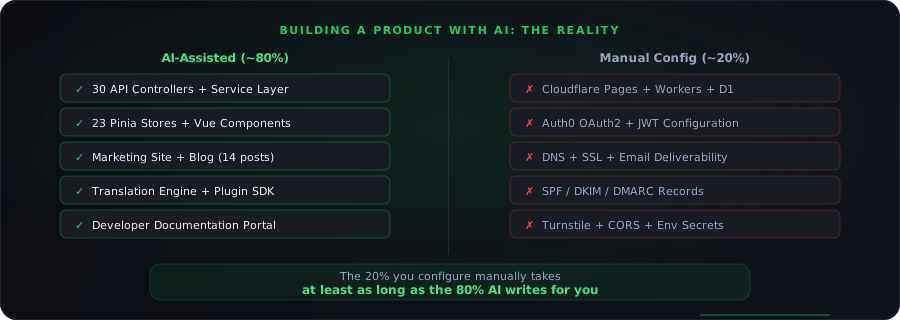
For any given feature, Claude handles about 80% of the work by volume. Lines of code, files created, problems solved. But the remaining 20% is entirely manual configuration work: clicking through web dashboards, copying keys between services, debugging integration issues that only show up in deployed environments.
And that 20% takes at least as long as the other 80%. Sometimes longer.
But here's the thing that changed compared to how solo development used to work: in the past, you were either writing code or doing config. Never both. If you spent a day setting up Stripe webhooks and testing payment flows in their dashboard, that was a day you wrote zero application code. Your project just stopped moving forward on one front while you worked on the other.
With Claude, that's no longer true. While I was deep in the Stripe dashboard figuring out webhook endpoints and event types, Claude was building out the next service interface. While I was clicking through Google's OAuth consent screen setup for the third time because I got the scopes wrong, Claude was writing Vue components. My head was in configuration land, but the codebase kept growing. That's genuinely new. A solo developer can now move on two fronts at once, and that might be the biggest practical difference AI makes for small teams.
That said, when you're writing code with AI help, you're in a tight feedback loop. Write, test, fix, iterate. When you're debugging why your Cloudflare Worker returns CORS errors only in production, you're staring at dashboard screenshots, reading community forum posts, and trying random configuration changes hoping one of them sticks.
What Needs to Change
I do not think this is a permanent limitation. The missing piece is obvious: AI tools need to be able to interact with third-party service APIs and dashboards. Not just write code that calls them, but actually configure them.
Some of this is starting to happen. MCP (Model Context Protocol) servers for various services are popping up. Anthropic is clearly thinking about tool use as a first-class concept. But we're nowhere near the point where I could say "set up my Cloudflare Worker with a D1 database, configure the custom domain, and add Turnstile protection" and have it actually happen.
Until then, the honest story of building a product with AI is this: AI is an incredible accelerator for writing application code. But a sellable product is only about half application code. The other half is infrastructure, third-party integrations, deployment pipelines, email deliverability, domain configuration, and security setup. And for all of that, you're on your own.
(This is, incidentally, one of the reasons we're building Rasepi as a hosted platform and not just shipping open-source code. Getting documentation software to run is not that hard. Getting it to run reliably, with proper auth and email and hosting? That's the product.)
If You're About to Try This
A few practical things I learned that might save you time:
-
Start with the infrastructure, not the code. Set up your hosting, your auth provider, your email service, and your custom domains first. Get a "hello world" deployed to production before you write a single line of real application code. The number of problems that only surface in deployed environments is depressing.
-
Keep a credentials doc. You will have API keys, client IDs, callback URLs, database IDs, and secret keys scattered across 8 different dashboards. I use a local encrypted file. You can use 1Password or whatever. Just have a single place.
-
Budget twice as much time for "the last mile" as you think. If Claude helps you build the feature in 2 hours, budget another 2 hours minimum for deploying it, configuring the integrations, and testing in production.
-
Accept that some days will be all dashboard work. There were full days where I wrote essentially zero code but made critical progress: registering OAuth apps across three providers, setting up email, debugging DNS. Those days feel less productive but they're not.
Three weeks is still wildly fast for what I built. I'm not complaining about Claude. It let a single developer build something that would normally take a small team the better part of a year. But the story being told in the AI hype cycle (prompt, code, ship, done) is missing the entire middle section where you make it real.
The app is the easy part. Making it real is the job.