Open Confluence right now and find a document you need to read. What do you see?
A toolbar. Edit buttons. Comment boxes. Page history links. A sidebar full of navigation you don't need. Breadcrumbs. Metadata fields. Permission indicators. An entire authoring interface wrapped around the text you came here to read.
Now think about what you actually wanted: the answer to a question, or the next three steps in a process, or a policy you need to reference before a meeting in ten minutes.
You came to consume. The interface assumed you came to create.
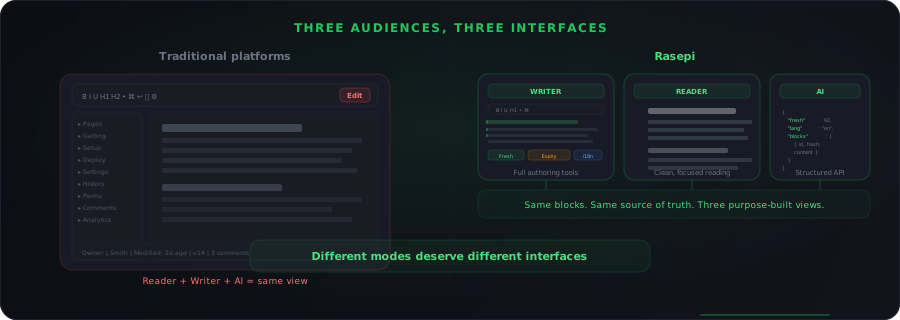
This is the default in almost every documentation platform. Confluence, Notion, SharePoint, GitBook, Nuclino, Slite. They all present the same environment to readers and writers. The page is the page. Everyone gets the same view, give or take a few permission-gated buttons.
It feels normal because we've never had anything else. But it's a design decision, not a law of nature. And it's the wrong one.
Reading and writing are not the same cognitive task
This isn't a UI preference. It's a fundamental difference in how the brain works.
When you write, you're in generative mode. You're constructing, organising, deciding what to include and what to leave out. You need tools: formatting options, structure controls, media embedding, metadata fields, version history, collaboration features. The interface should give you power and flexibility.
When you read, you're in receptive mode. You're scanning, filtering, extracting what's relevant, and trying to move on. You need clarity: clean typography, focused layout, minimal distraction. The interface should get out of the way.
Cognitive psychology has a clear framework for this. Cognitive Load Theory, developed by John Sweller in the late 1980s, distinguishes between intrinsic load (the difficulty of the material itself), germane load (the effort of learning and integrating), and extraneous load (everything the environment adds that doesn't help). Every toolbar, sidebar, and edit button visible to a reader is extraneous load. It doesn't help them understand the content. It actively competes for attention.
Research by Mayer and Moreno (2003) on multimedia learning demonstrated that reducing extraneous elements improves both comprehension and retention. Their coherence principle is direct: people learn better when extraneous material is excluded rather than included. A documentation interface that shows authoring controls to readers is violating this principle on every single page load.
The reader doesn't need to see the writer's tools. Showing them anyway isn't neutral. It's actively harmful to comprehension.
How current platforms handle this (they mostly don't)
Let's look at what exists.
Confluence has a read mode and an edit mode, but the read mode is still surrounded by the platform's navigation, metadata, and page tree. The editing toolbar disappears when you're not editing, but the mental frame of "this is an editable wiki page" never fully goes away. Every reader sees the "Edit" button. The page whispers: you could change this.
Notion is worse in this regard. Its core design philosophy is that everything is always editable. Click anywhere and you're typing. That's brilliant for writers. It's terrible for readers who just want to absorb content without the anxiety of accidentally modifying something. Notion's own template gallery shows this: every template is a workspace, not a publication.
SharePoint technically supports different page layouts for viewing and editing, but the overall experience is still corporate intranet. Readers feel like they're inside an enterprise tool, not reading a document optimised for understanding.
GitBook comes closest to a reading-first experience, with its clean documentation-style output. But even there, the reader experience serves the assumption that the reader is a developer looking at technical docs. It's not designed for the general knowledge consumer.
None of these platforms treat reading as a fundamentally different activity from writing. They treat it as writing with the toolbar hidden.
The cost of a single interface
This isn't just an aesthetics problem. It has measurable consequences.
Information overload reduces comprehension
A study published in the Journal of Consumer Research found that information overload leads to poorer decision quality, with the effect increasing as the ratio of irrelevant to relevant information grows. A documentation page with visible authoring controls, navigation trees, and metadata fields increases that ratio for every reader who isn't there to write.
Context switching has a real cost
When an interface signal says "you can edit this," it activates a different cognitive frame than "read this." Gloria Mark's research at UC Irvine on attention and multitasking found that it takes an average of 23 minutes and 15 seconds to fully refocus after a context switch. A reader who momentarily considers editing (even to fix a typo) has been pulled out of reading mode. That's not a hypothetical. Anyone who has used Notion knows the experience of clicking to select text and accidentally starting to type.
Readers and writers have different needs from the same content
A writer needs to see structure, formatting markers, block types, metadata, and collaboration signals. They need the full machinery.
A reader needs to see clean text, clear hierarchy, and the fastest path to the information they're looking for. They need the content, not the machinery.
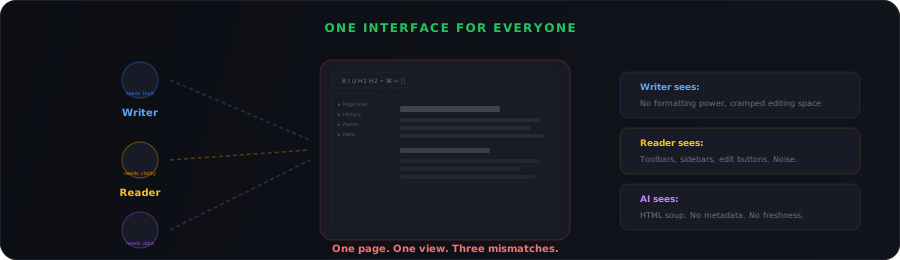
Serving both from the same interface means neither gets an experience optimised for what they're actually doing.
And then there's the third audience: AI
This is where it gets complicated, and where existing platforms are completely unprepared.
Documentation in 2026 has three distinct consumers, not two:
- Writers who create and maintain content
- Readers who consume content visually
- AI systems that retrieve, parse, and synthesise content programmatically
Each of these audiences needs a fundamentally different interface to the same underlying content.
Writers need rich editing tools, collaboration features, and structural controls. Readers need clean, focused presentation with minimal distraction. AI needs structured, machine-parseable output with explicit metadata: freshness signals, classification labels, block-level addressing, and clean semantic markup.
As we discussed in Builders, Not Developers, AI intermediaries are already the dominant consumer of documentation for a growing share of knowledge workers. GitHub's 2024 developer survey found 97% of enterprise developers have used AI coding tools. By 2026, 84% of developers use AI tools regularly, with 41% of all code being AI-generated.
These AI systems don't care about your sidebar or your toolbar. They need clean data. And a platform that conflates the reader view with the writer view is also conflating the AI-consumable surface with the human authoring surface. That's three mismatches in one interface.
How Rasepi separates the experiences
Rasepi is built around the principle that creating content and consuming content are different activities that deserve different interfaces.
The writer's environment
When you're writing in Rasepi, you get a full authoring environment. Rich text editing with TipTap, block-level controls, translation status indicators, expiry management, collaboration tools, content structure views, and everything else a writer needs to create and maintain high-quality documentation.
The writer sees the machinery because they need the machinery.
The reader's environment
When someone consumes a Rasepi document, they see a clean, focused reading experience. No editing chrome. No toolbars. No "you could modify this" signals. Just the content, presented in a layout optimised for comprehension and scanning.
The reader doesn't see the edit button because they're not here to edit. They're here to learn something, follow a process, or find an answer. The interface respects that intent.
The AI surface
For AI consumers, Rasepi exposes content through structured APIs with full metadata. Every block carries its freshness score, translation status, content hash, and classification labels. AI systems can query content at the block level, filter by freshness, exclude stale or draft material, and retrieve exactly the structured data they need.
No scraping a wiki page and hoping for the best. The AI gets a purpose-built interface, just like the reader and the writer do.
One content layer, three interfaces
The important thing is that we're not maintaining three copies of the content. This isn't the five-copies-of-onboarding problem we discussed in Stop Maintaining Five Copies of the Same Document.
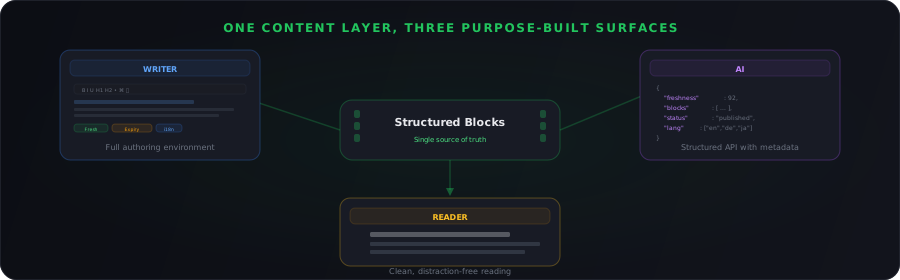
It's one content layer, stored as structured blocks, served through three different views optimised for three different audiences.
The writer edits blocks. The reader sees assembled, styled content. The AI queries structured data with metadata. Same blocks. Same source of truth. Different presentation layer for each consumer.
This is only possible because of the block-level architecture. Each piece of content is an individually addressable unit with its own metadata. You can present those blocks differently depending on who's asking for them:
| Audience | Needs | Gets |
|---|---|---|
| Writer | Formatting, structure, collaboration, metadata | Full authoring environment with block-level controls |
| Reader | Clean text, clear hierarchy, fast scanning | Focused reading view, no editing chrome |
| AI | Structured data, freshness scores, classification | Block-level API with full metadata |
Why this matters more than it looks
You might read this and think: "It's just UI. Different views of the same thing. How important can it be?"
Very important, it turns out.
Reader trust
People trust content that looks published. When a page looks like a wiki that anyone can edit, readers unconsciously discount it. When the same content is presented in a clean, publication-quality reading view, it carries more authority. This isn't irrational. It's a signal that someone took the presentation seriously, which implies they took the content seriously too.
Nielsen Norman Group has studied this extensively. Their research on content credibility shows that design quality and presentation are among the strongest signals users rely on to assess content trustworthiness. A cluttered editor view actively undermines the credibility of the content it displays.
Writer productivity
Writers who work in a dedicated authoring environment don't have to context-switch between "am I reading or am I writing?" The tools are there because they're supposed to be there, not because the interface couldn't decide who was looking at it.
AI reliability
When AI systems have a purpose-built surface with structured metadata, they can make better decisions about what to retrieve and what to exclude. They can check freshness scores before including a block in an answer. They can respect classification labels. They can filter by language, status, or audience. None of that is possible when the AI is scraping the same HTML page that was designed for human readers.
The mental model shift
The fundamental assumption of most documentation platforms is: the page is the unit, and everyone interacts with the page.
Rasepi's assumption is different: the block is the unit, and different audiences interact with blocks through purpose-built surfaces.
That sounds like a small architectural distinction. It's not. It's the difference between a tool that accidentally shows content to AI systems and one that deliberately serves them. Between a writing environment that happens to be readable and a reading experience that was designed from scratch. Between one good-enough interface and three great ones.
Documentation is no longer just written and read. It's written, read, queried, translated, scored, classified, and served to AI systems at scale. A single interface can't optimise for all of that, and pretending it can is how we ended up with wikis that nobody wants to read and AI assistants pulling answers from pages that were never designed to be machine-consumed.
Readers and writers are in different mental modes. AI is in a different mode entirely. The interface should reflect that.